Hello 👋, so in today’s article I will be writing about how I created a custom file Storage provider for Microsoft Orleans.
The purpose of this project is not to create a production ready storage provider but something I can use to easily visualize the data persistence during app development and also get a better understanding of persistence in Orleans 😅.
The image below illustrates what the custom file persistence layer looks like
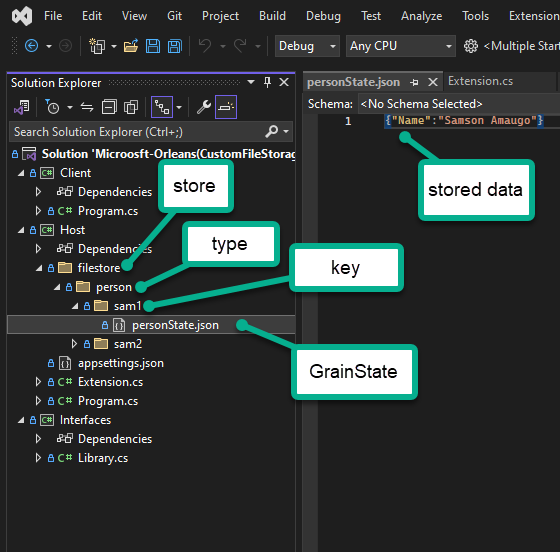
To create a custom storage provider, I had to implement the IGrainStorage interface which is structured below:
public interface IGrainStorage
{
  Task ReadStateAsync<T>(string stateName, GrainId grainId, IGrainState<T> grainState);
  Task WriteStateAsync<T>(string stateName, GrainId grainId, IGrainState<T> grainState);
  Task ClearStateAsync<T>(string stateName, GrainId grainId, IGrainState<T> grainState);
}
Looking at the interface you can see that they all have similar signature, bearing “stateName“, “grainId” and “grainState” as parameters.
A Grain can have multiple states stores so the “stateName” helps to identity the particular state during data persistence from a Grain.
A Grain’s Id comprises of two important things: The type and the key.
Let’s say I have a Grain called “VotingGrain”. By default the Grain’s type is identified as “voting“
The key is the unique value sent by the client to interact with the a particular Grain. In the code below the Grain’s key is idenitified as “football“.
var soccerPolls = client.GetGrain<IVotingGrain>("football");
And finally from the IGrainStorage interface, the IGrainState<T> parameter holds a reference to the data in a Grain.
To use the Options pattern while creating the File Storage provider extension, I created the the type below:
    public class FileConfigurationOptions
    {
        // the location of the folder to use as a store
        public string? StorePath { get; set; }

        // the section in the config file to retrieve store path from
        public const string MyFileConfiguration = "FileConfiguration";
    }
Next, I created the file storage provider by implementing the IGrainStorage interface
public class FileStorage : IGrainStorage
{
    private void _ensureFileExists(string filePath)
    {
        if (!File.Exists(filePath))
        {
            var directory = Path.GetDirectoryName(filePath);
            Directory.CreateDirectory(directory!);
            File.Create(filePath).Close();
        }
    }

    private string _getFilePath(GrainId grainId, string stateName)
    {
        return Path.Combine(_options.Value.StorePath!, grainId.Type.ToString()!, grainId.Key.ToString()!, stateName + ".json");
    }
    private readonly IOptions<FileConfigurationOptions> _options;
    public FileStorage(IOptions<FileConfigurationOptions> options) => _options = options;
    public Task ClearStateAsync<T>(string stateName, GrainId grainId, IGrainState<T> grainState)
    {
        var path = _getFilePath(grainId, stateName);
        File.Delete(path);
        return Task.CompletedTask;
    }

    public async Task ReadStateAsync<T>(string stateName, GrainId grainId, IGrainState<T> grainState)
    {
        var path = _getFilePath(grainId, stateName);
        _ensureFileExists(path);
        var data = await File.ReadAllTextAsync(path);
        if (string.IsNullOrEmpty(data)) return;
        grainState.State = JsonSerializer.Deserialize<T>(data)!;
    }

    public async Task WriteStateAsync<T>(string stateName, GrainId grainId, IGrainState<T> grainState)
    {
        var path = _getFilePath(grainId, stateName);
        _ensureFileExists(path);
        var data = JsonSerializer.Serialize(grainState.State);
        await File.WriteAllTextAsync(path, data);
    }
}
The storage implementation above uses a combination of Grain’s ID Type, Grain’s ID Key and Grain’s stateName to create the file path to the file that holds the stored data.
One limitation of the storage provider mentioned above is that I didn’t use ETags to prevent concurrency issues. If the AlwaysInterleave attribute setting is enabled for a Grain’s method that writes to storage, it could cause errors due to race conditions. However, without this configuration, everything works fine 😅
Next, I created my extension method to easily help me setup the File Storage provider in Orleans. I created two methods, the first overload allows you to set the path of the “filestore” directly in the code while the second one reads the path from the Orleans configuration file.
    public static class FileStorageExtensions
    {
        public static IServiceCollection AddFileStorage(this IServiceCollection services, Action<FileConfigurationOptions> configureOptions)
        {
            services.AddOptions<FileConfigurationOptions>()
                       .Configure(configureOptions);
            return services.AddKeyedSingleton<IGrainStorage, FileStorage>("fileStateStore");
        }

        public static IServiceCollection AddFileStorage(this IServiceCollection services)
        {
            services.AddOptions<FileConfigurationOptions>()
               .Configure<IConfiguration>((settings, configuration) =>
               {
                   configuration.GetSection(FileConfigurationOptions.MyFileConfiguration).Bind(settings);
               });
            return services.AddKeyedSingleton<IGrainStorage, FileStorage>("fileStateStore");
        }
    }
You can see above that Orleans makes use of the AddKeyedSingleton feature to identify the store implementation.
And finally, I configured Orleans to use the custom file provider below:
IHostBuilder builder = new HostBuilder()
    .UseOrleans(silo =>
    {
        silo.UseLocalhostClustering();
        silo.Services.AddFileStorage();
    });

builder.ConfigureAppConfiguration((context, config) =>
{
    config.AddJsonFile("path_to_config_file.json", optional: true);
});
using IHost host = builder.Build();

await host.RunAsync();
Now when I select the store using the “fileStateStore” value in the PersistentState attribute of the Grain’s constructor, the Grain persists its data using the custom store which can be seen in the code below:
public class PersonGrain : IGrainBase, IPersonGrain
{
    IPersistentState<PersonState> state;
    public IGrainContext GrainContext { get; }
    public PersonGrain(IGrainContext context, [PersistentState("personState", "fileStateStore")] IPersistentState<PersonState> state) => (GrainContext, this.state) = (context, state);

    public async Task AddName(string name)
    {
        var context = this.GrainContext;
        state.State.Name = name;
        await state.WriteStateAsync();
    }
    public Task<string> GetName()
    {
        return Task.FromResult($"My name is {state.State.Name}");
    }
}


public class PersonState
{
    public string? Name { get; set; }
}
Thanks for reading through, the link to the project can be seen here.
To learn more about Grain persistence in Microsoft Orleans click here.
Bye 👋